See every AI call, its cost, and its conversation.
Monitor LLM costs, token usage, latency, conversations, and tool calls across every provider. Group calls into conversations, break them down per user, and flag the ones that need attention. Works with OpenRouter, OpenAI, Anthropic, and any OpenTelemetry-compatible provider.
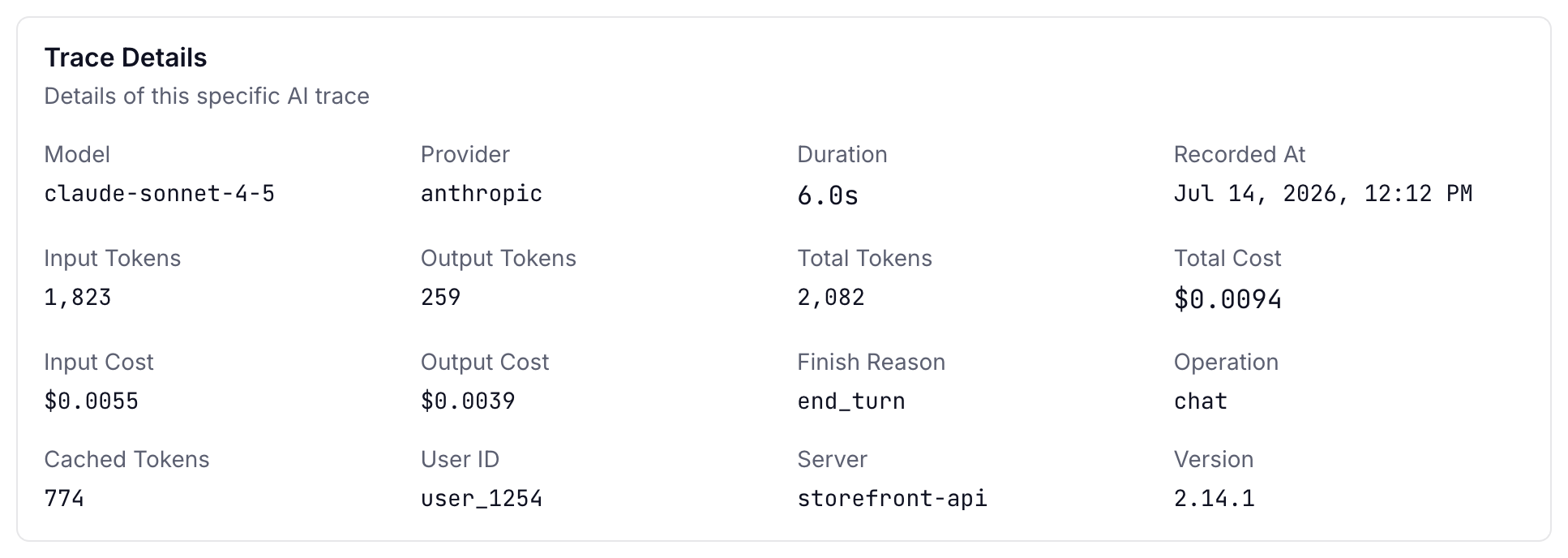
Know exactly what AI costs you
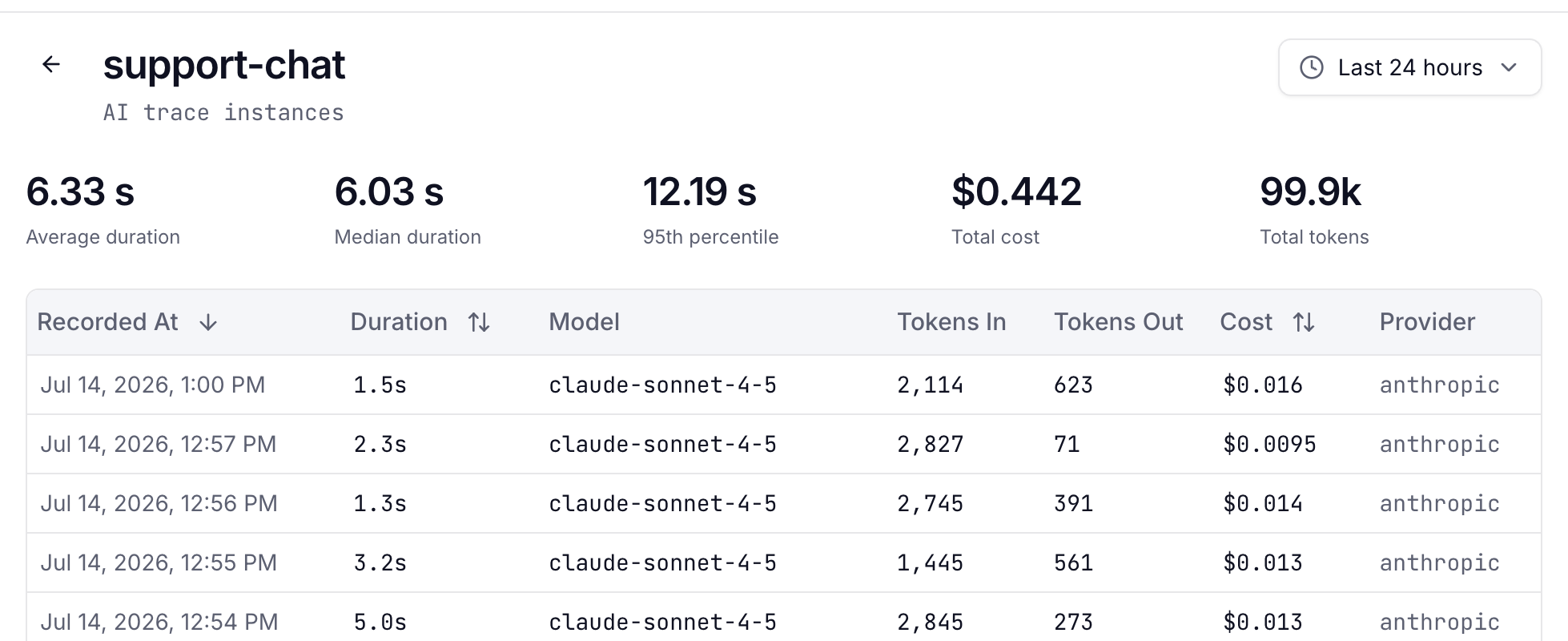
Every AI call tracked with input cost, output cost, and total cost. See breakdowns per agent, per model, and per time period. Spot cost spikes before they hit your invoice.
- Per-call cost tracking with input / output breakdown
- Aggregated cost per agent and model
- Token usage with cached and reasoning token tracking
- Anomaly detection on cost per call
Replay every conversation, tool calls included
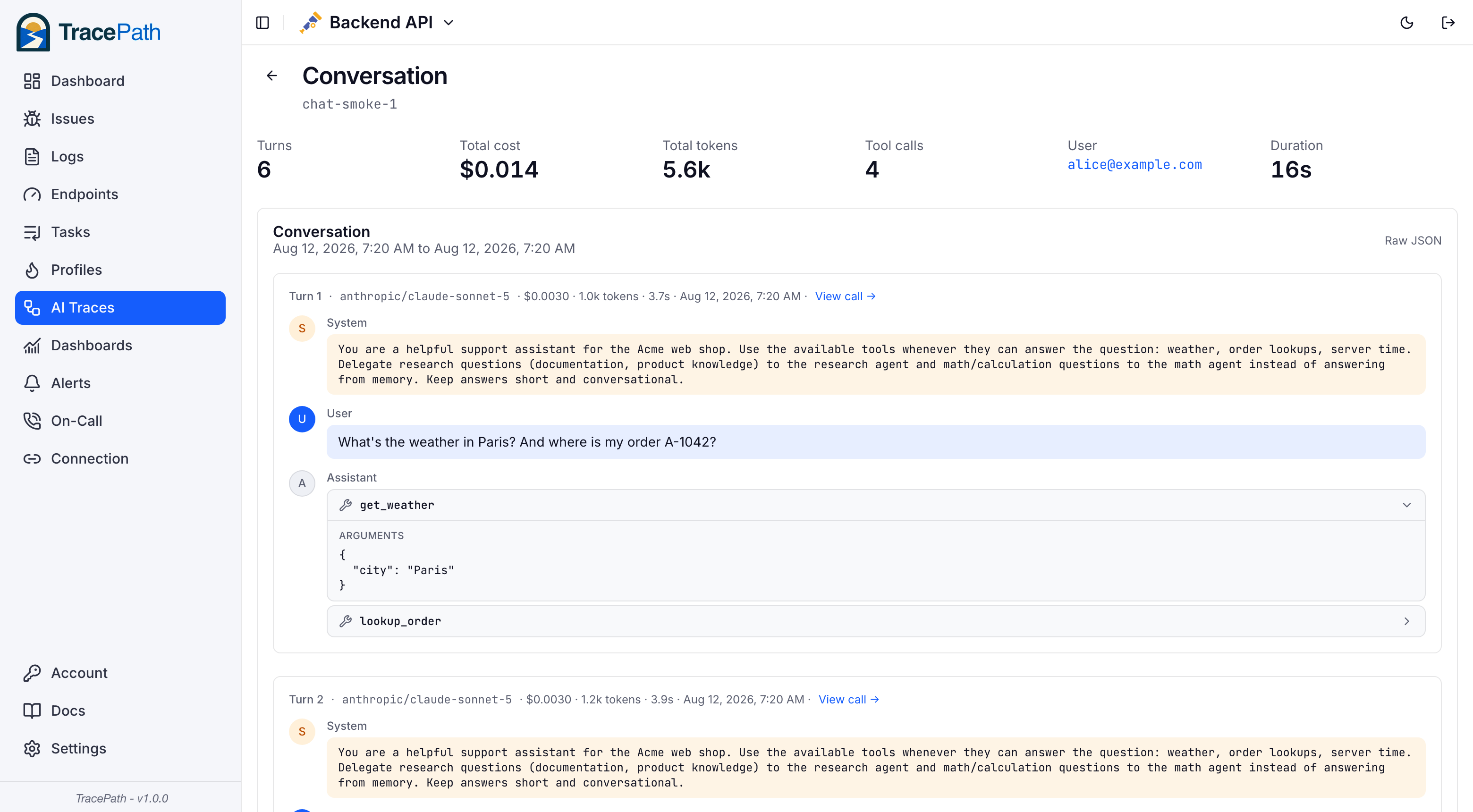
See the exact prompt sent to the model and the full response it generated. Multi-turn conversations render as one chat timeline, with tool calls shown inline: function name, arguments, and results. Debug unexpected model behavior, catch hallucinations, and understand what your AI agents are actually doing.
- Full prompt + completion stored and rendered as chat
- Tool calls rendered with arguments and paired results
- Sub-agents traced under their own name in the same conversation
- Raw JSON view for debugging edge cases
- Privacy mode available to exclude conversation content
Find the outliers, per conversation and per user
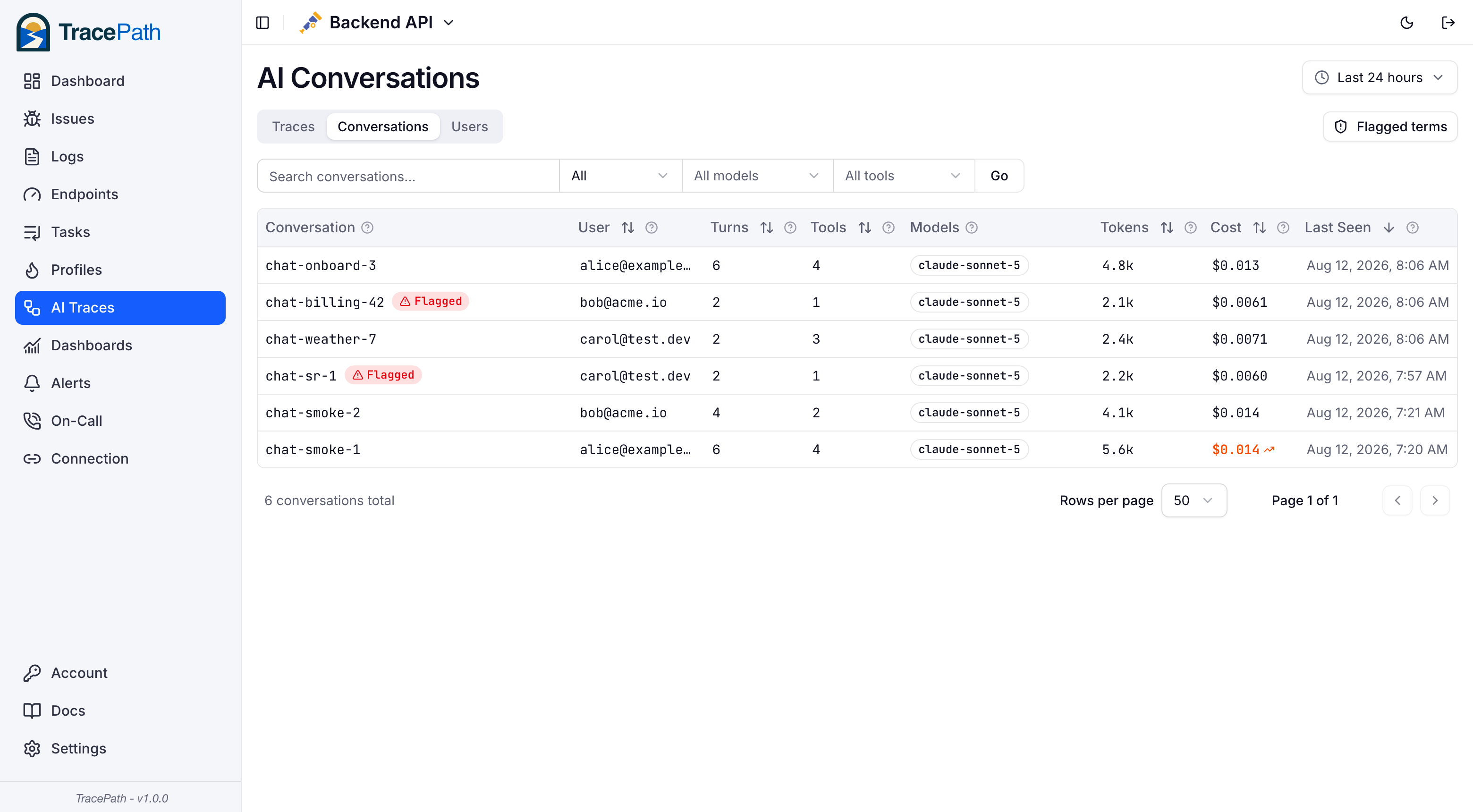
Calls group into conversations automatically. See turns, cost, tokens, and tool usage per conversation, and roll it all up per user: how long conversations run, what they cost, and who your heaviest users are. Anything above the 95th percentile is highlighted.
- Turns, cost, tokens, and tool calls per conversation
- Per-user analytics: median conversation length, cost per conversation
- Filter by user, model, or specific tool with removable filter pills
- P95 outlier highlighting on cost and conversation length
Flag conversations that need attention
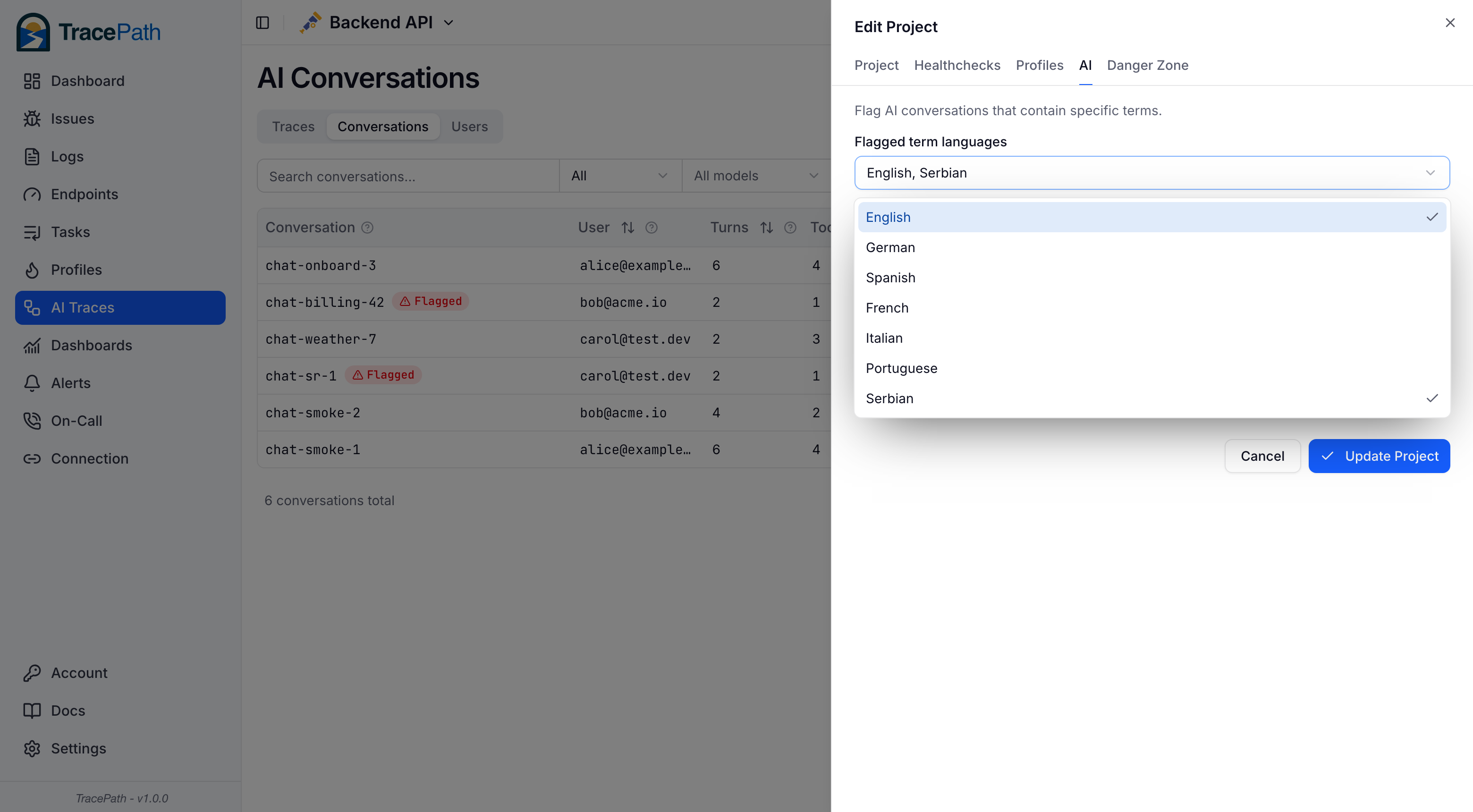
Every prompt and completion is scanned at ingest against built-in profanity lists in seven languages plus your own custom terms: competitor names, refund phrases, compliance keywords. Flagged conversations get a badge, a filter, and can trigger alerts.
- Built-in profanity packs: English, German, Spanish, French, Italian, Portuguese, Serbian
- Custom per-project terms for anything beyond profanity
- Indexed once at ingestion, searchable and filterable instantly
- Alert rules for flagged content and runaway conversation cost
Understand AI latency at every percentile
AI calls have wildly variable latency. See P50 and P95 duration breakdowns per agent, identify which models or providers are causing slowdowns, and track performance over time.
- P50 / P95 latency per agent and model
- Drill down from agent to individual calls
- Throughput and token usage trends
- Compare providers side-by-side
Zero code changes required
If you're using OpenRouter, enable Observability in your settings and point it at TracePath. That's it. For other providers, any OpenTelemetry-instrumented AI call with gen_ai.* attributes is automatically captured.


Trace AI like any other service
Costs, tokens, latency, and conversations, all in one place.
Questions about AI tracing
Why do I need AI observability?
AI API calls are expensive and unpredictable. A single prompt with a large context window can cost 100x more than average. Without observability, cost spikes go unnoticed until the invoice arrives. AI tracing gives you per-call visibility into costs, token usage, latency, and the actual conversations happening between your app and AI models.
Which AI providers are supported?
Any provider or gateway that exports OTLP traces with gen_ai.* semantic convention attributes.
OpenRouter has built-in support. Just enable Observability in your settings. For other providers, use any OpenTelemetry SDK to instrument your AI calls and send them to TracePath.
Is the conversation content stored securely?
Conversation content (prompts and completions) is stored separately from trace metadata in object storage, on EU infrastructure. You can also drop content at the source and send only metadata — model, tokens, latency and cost — if prompts must never leave your network.
How does this work with OpenRouter?
OpenRouter has a built-in Observability feature that broadcasts OTLP traces for every LLM call. You add TracePath as an 'OpenTelemetry Collector' destination in your OpenRouter settings with your TracePath endpoint and project token. No code changes needed.
How does per-user cost and conversation tracking work?
TracePath keys per-customer analytics on the user.id span attribute (with OpenRouter, just pass the user field in your requests). Set it to a stable identifier for the end user of your product: your internal account id, a tenant id, or an email. The same user must carry the same value across all their conversations.
Never put session ids or random values there — that is what the conversation id is for. With a stable id, the Users view shows conversation count, median conversation length, and cost per conversation for every customer. If PII must stay out of telemetry, use an internal id or a hash; the analytics only need stability.
Can I find conversations containing specific words, like profanity?
Yes. TracePath scans every prompt and completion at ingestion against built-in profanity lists (seven languages) plus custom terms you configure per project. Matches are stored on the call, so flagged conversations are instantly filterable and searchable, and an alert rule can notify you the moment flagged content appears. Because scanning happens at ingest, there is no expensive query-time content search.
Can I track costs across multiple models?
Yes. AI traces capture the specific model used for each call (e.g., openai/gpt-4-turbo, anthropic/claude-3-opus).
You can see cost breakdowns per model, compare token efficiency across providers, and identify which models give you the best value.